If you like gaming, you may have noticed your phone getting hot after playing for a while. This happens because the phone’s system is working too hard, often due to demanding graphics or both the CPU and GPU running at the same time. If your phone stays hot for too long, its performance can drop significantly, causing lag while you play.
Overheating while gaming is a common problem. It’s important to fix it to keep your device running well for a long time. You can address overheating in several ways. First, adjust the graphics quality. Second, close any apps you are not using. Lastly, take breaks from gaming. Here are some tips to help with overheating while gaming. Check out the full review below!
Table of Contents
Close Background Applications Before Playing
To prevent your phone from overheating while gaming, close all apps running in the background. Even if you don’t see the apps on your home screen, they still use RAM and processing power. This makes your phone work harder even before you start the game.
When multiple apps use resources at the same time, the processor and RAM work harder, causing your device to heat up faster during gaming. You can close background apps using the recent apps view or task manager on your smartphone before starting a game.
Lower Game Graphics Settings or Frame Rate
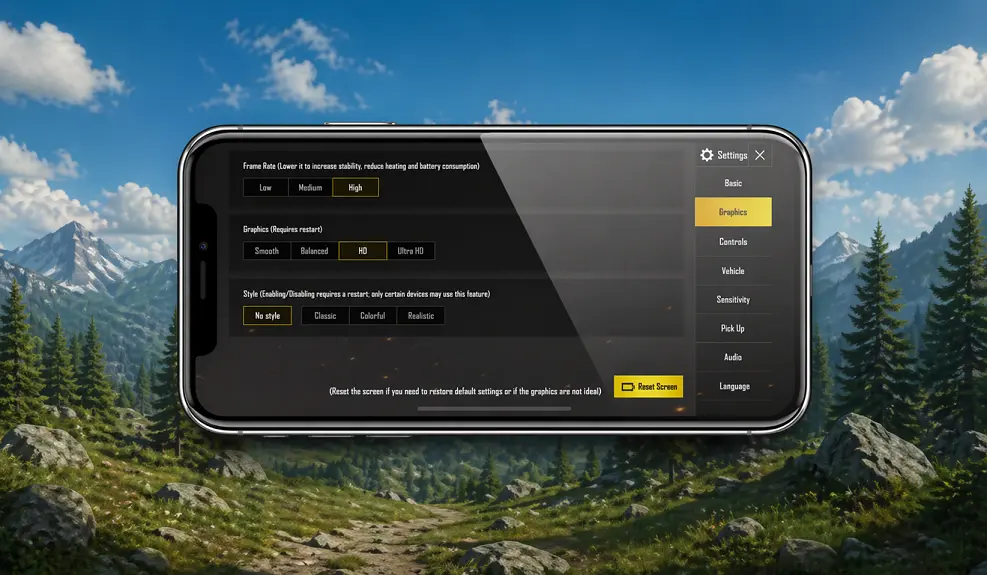
A good way to reduce overheating while gaming is to change the graphics and frame rate settings in the game. Many modern games let you adjust the visual quality settings to options like Ultra, High, Medium, or Low.
Choosing a higher graphics quality increases the workload on your phone’s chipset and graphics card. This can make your phone heat up quickly. To help your phone run better and prevent overheating, you can lower the graphics settings to medium or low.
When gaming on your phone, the frame rate, or the number of images displayed each second, affects how hot the device gets. Many games let you lower the frame rate. To keep your phone cool, consider setting the frame rate to a lower level.
Reduce Screen Brightness
If your phone overheats while gaming, try lowering the screen brightness. The screen uses a lot of power, especially at high brightness. A bright screen can drain the battery quickly and stress the system. This makes your phone heat up faster while you play.
Lowering screen brightness reduces energy consumption and stabilizes the phone’s temperature. Many recent phones also have adaptive brightness, which adjusts levels based on ambient light.
Avoid Playing While Charging
To prevent your phone from overheating while gaming, avoid playing games while it is charging. When you play games while plugged in, your phone’s battery gets power, but it also has to work harder to run high-graphic games.
Playing games while your phone is charging can make it heat up quickly. This is because both activities create heat. To avoid this, it’s best to charge your phone first and then play games.
Play in a Cool or Air-Conditioned Environment
To help prevent your phone from overheating while gaming, try to play in a cool or air-conditioned room. High temperatures or poor airflow can make your phone overheat more quickly. When you play for a long time, the heat from your phone cannot escape effectively into the surrounding air.
To handle this situation, play games in a cool or air-conditioned room. This helps your phone release heat better through its natural ventilation. A cooler room also lowers the heat on the device.
Enable Power Saving Mode or Game Mode
One of the most effective ways to combat overheating on your phone while gaming is to utilize built-in features like Power Saving Mode or Game Mode. Many recent phones now offer Power Saving Mode or Game Mode, which can limit background activity, manage CPU usage, and optimize resource allocation while gaming.
Take Regular Play Breaks
When you play games on your phone for a long time, the CPU and GPU work hard, which makes the phone heat up. To help prevent overheating, take regular breaks from gaming. Pause your game every 30 to 60 minutes and let your phone rest for a few minutes.
Here are some ways to manage your phone’s overheating while gaming. For a better gaming experience, consider using the latest phones with advanced gaming features. For example, the Iqoo has a special cooling system that can lower temperatures by up to 14 degrees Celsius.