Sometimes, we need to record phone calls with people we care about or even those we don’t. Whether you need this for a good reason or not, you can find many call recording apps for Android phones. Various developers offer these apps, and they each have different features and levels of user-friendliness.
We’ve found some useful apps for business negotiations, chatting with friends, or staying organized. These apps often do more than just record calls; they also offer features like a phone book and spam protection.
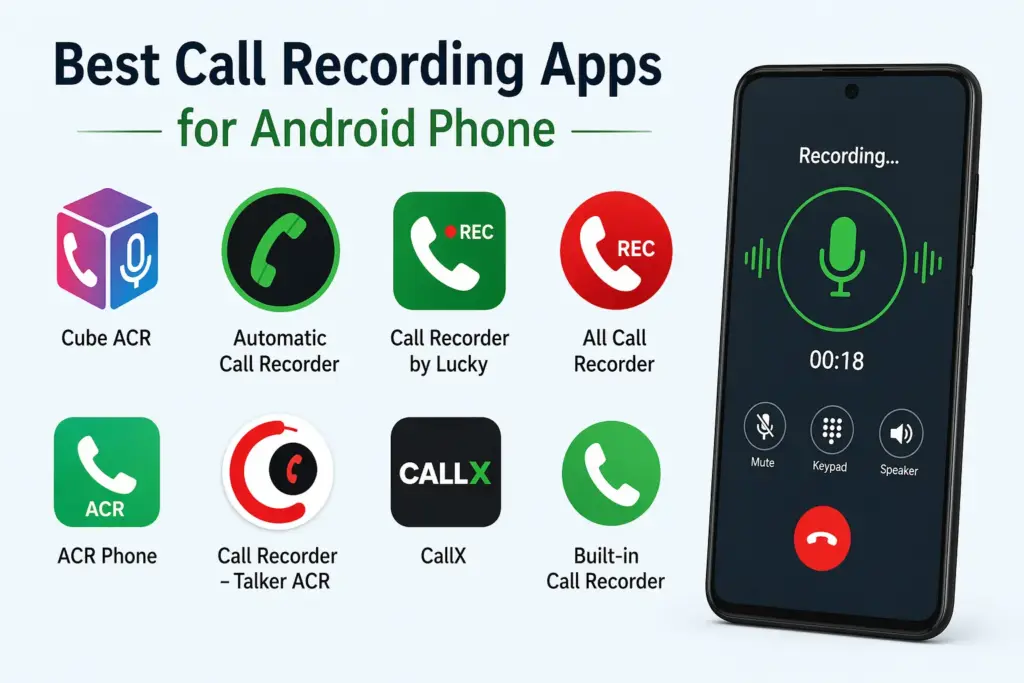
Call recording is an important feature of Android phones. It lets you save a voice conversation for future reference. However, the way this feature works can vary by device. Some phones alert you with a loud notification before recording, while others may not notify you at all. If you find these limitations annoying, consider using a dedicated call recording app. Here are five of the most popular options.
List of Best Call Recording Apps for Android
1. Automatic Call Recorder ACR

An app with a simple and intuitive interface that allows you to record conversations, save them to your phone’s memory, and share them with contacts if needed. It allows you to record specific conversations selected by the phone owner (from all contacts in the phone book or from specific numbers specified in the settings), and then add notes regarding the call content.
You can also save them in cloud storage (for example, Google Drive or Dropbox) so that you don’t lose your recordings if something happens to your smartphone.
2. Call Recorder
It allows you to easily record any of your phone conversations. The main advantage is that no activation is required—after installing the service, it immediately begins automatically recording all conversations (you can disable this option in the app settings).
Recordings are saved to a memory card installed in the smartphone, allowing for convenient playback or sharing. Recording quality is usually an issue, especially if the person you’re talking to speaks quietly. However, this issue can be easily resolved using specialized software
3. Truecaller

It can do more than just record conversations; it can also block SMS messages, identify and filter unknown numbers, and find new ones—by location, for example. Essentially, Truecaller is a large phone directory containing contacts from all over the world. Numbers are rated: trusted users receive a high rating, while scammers and spammers receive a low rating. Like several other apps in this selection, it’s available for both Android smartphones and iPhones.
You can make calls directly from the app. Truecaller also lets you send messages, photos, and videos to any other user. Basically, it’s a jack of all trades when it comes to call recording.
4. Cube ACR
The Cube ACR’s unique feature is that it can record conversations both over the phone and in internet-based VoIP apps, such as WhatsApp, Viber, Skype, or Telegram.
You can select contacts with whom the app will always record conversations, or, conversely, create a list of exceptions. You can add a conversation to your favorites or partially record it by pressing a button at the desired moment. The app also features a smart speaker switch. To listen to the recording from the speaker instead of the speaker, simply hold the phone to your ear, and it will automatically switch to the desired mode.
5. Call Master
Another call recording app for Android smartphones only. Like Truecaller, Call Master is a great tool for preventing spam calls. It has its own database of unwanted numbers. Calls can be saved both automatically and manually.
In addition to being ad-free, the premium version automatically updates the spam number database. There’s also an unlimited number of numbers that can be blacklisted.
6. Call Recorder — ACR
It records all calls—both outgoing and incoming—making it a very convenient service for this purpose. The app’s settings allow you to choose the folder where files are saved, as well as the saving format. The paid version also supports integration with cloud storage services.
An extremely functional yet simple application that is perfect for use when you need to record phone calls.
7. Recostar
This call recorder displays a list of contacts. You can view call history for any period. You can forward recordings to email, social media, or messengers. Recordings are stored both on the phone and in cloud services (such as Amazon). They have a shelf life of up to one month. The cloud can store up to 300 minutes of audio.
The app requires the “Conference Call” feature to be enabled. Alternatively, you can take advantage of the premium version, Recostar Pro.
In addition to simplified connection, recordings can be stored here indefinitely and in any size. Prices start at 199 rubles per month. The developer claims that low internet speeds don’t affect audio quality: you can record without Wi-Fi or 4G.
8. Call & Voice Recorder App
Recordings can be stored in the cloud. By default, 20 GB of storage is available. If you’re concerned about your recordings and don’t want anyone to get to them, you can set a password: you can log in to the app with a PIN or Face ID / Touch ID. There’s no limit to the number of recordings—record as much as you want. In addition to the voice recorder, the Call & Voice Recorder App also features a screencast feature. So if you plan to record video, this is the app for you. Another nice feature is that you can edit audio tracks, trimming unnecessary parts.
However, you can only access most of the features in the premium version. Of the available features, the voice recorder is free, and you can set a PIN code.
Choosing the right app for recording outgoing or incoming calls on Android smartphones, with the option to save them to the device’s memory or cloud storage, is an interesting and important task. We hope we’ve helped you choose from the large selection currently available from various developers on the Play Store.